One of the first questions in any app project is “Which technology should we use?” Developers can argue about this for hours, but for a business owner the decision comes down to a few practical things: budget, launch date, the features your app needs and who will maintain it in three years.
The three options in plain words
Native (Kotlin for Android, Swift for iOS)
Two separate apps, each built with the platform’s own language and tools. You get the best access to new phone features and the most “at home” feel on each platform, but you build and maintain two codebases.
Flutter (by Google)
One codebase written in the Dart language that runs on Android and iOS, and can also target web and desktop. Flutter draws its own interface, so the app looks the same on every device. Google uses it in its own products, including Google Pay.
React Native (by Meta)
One codebase in JavaScript/TypeScript, using the platform’s native UI components. It’s a natural fit if your team already builds websites in React, because the JavaScript talent pool is very large.
Side-by-side
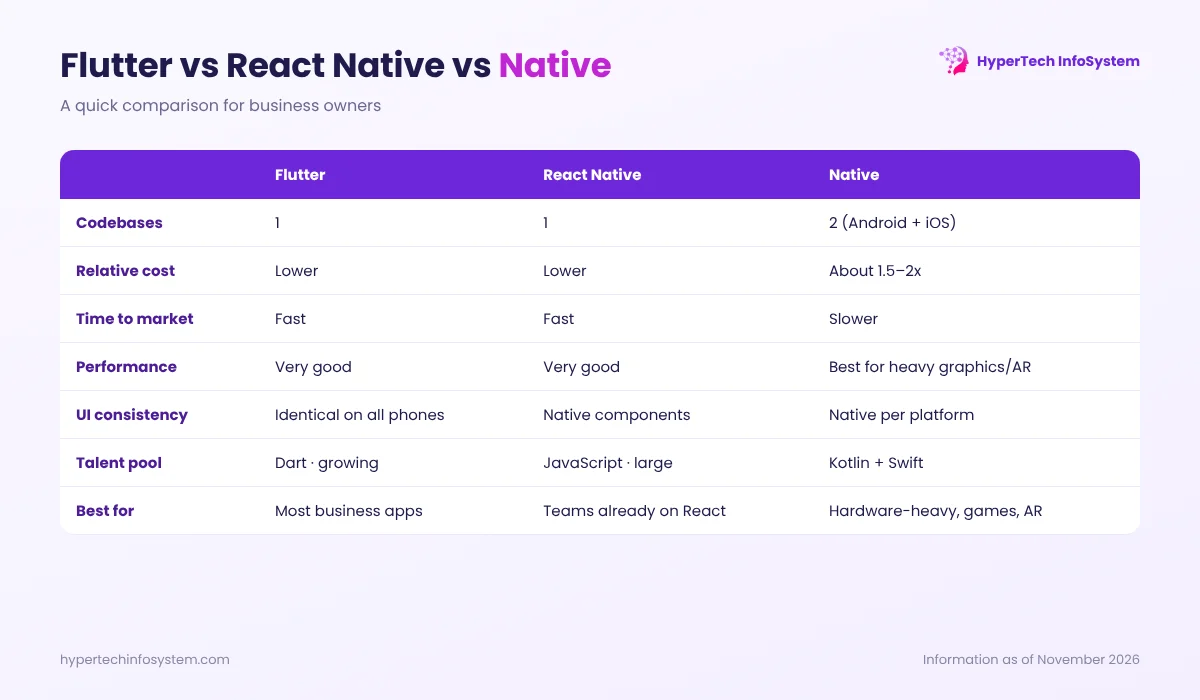
| Flutter | React Native | Native | |
|---|---|---|---|
| Codebases | 1 | 1 | 2 |
| Typical cost | Lower | Lower | Highest (about 1.5–2x) |
| Time to market | Fast | Fast | Slower |
| Performance | Very good for most apps | Very good for most apps | Best for heavy graphics, AR, low-level hardware |
| Same look on all phones | Yes, pixel-identical | Mostly, uses native components | Each platform looks native |
| Hiring | Smaller Dart pool, growing | Large JavaScript pool | Separate Android and iOS skills |
Both cross-platform frameworks have improved a lot. Flutter’s Impeller rendering engine and React Native’s “New Architecture” have closed most of the old performance gaps for typical business apps.
When we recommend each one
Choose Flutter when…
- You want Android and iOS on a sensible budget and timeline
- Your brand design should look exactly the same everywhere
- The app is a typical business app: e-commerce, booking, delivery, ERP or CRM companion, education, fintech dashboards
- You may later want a web or desktop version from the same code
Choose React Native when…
- Your in-house team already works in React and will maintain the app
- You want to share logic with an existing React web app
Choose native when…
- The app depends on advanced camera, AR, Bluetooth hardware or heavy 3D/gaming
- You need day-one support for new iOS or Android features
- Performance is the product itself, and budget allows two dedicated teams
Things that matter more than the framework
- The backend and admin panel. Most of the work in a business app is the server, APIs and the dashboard your team uses.
- UX for Indian users: works on low-end phones and patchy networks, supports regional languages and uses OTP login and UPI payments.
- Testing on real devices across price ranges, not just the developer’s phone.
- Maintenance: OS updates arrive every year, and Play Store and App Store policies change. Plan for it.
Our default and why
For most business apps we build at HyperTech InfoSystem, we use Flutter: one codebase, consistent design, strong performance and lower long-term cost. When a project genuinely needs native, we say so. For budget details, see our guide on mobile app development cost in India, or book a meeting to discuss your app idea.
Sources: Flutter and React Native official documentation; Flutter showcase (Google Pay). Cost ratios are indicative estimates from HyperTech projects.
0 Comments
No comments yet. Be the first to share your thoughts!
Leave a Comment
Your email will not be published. Comments appear after approval.